← Back to Brand Guides
Fellow Tally Coffee Scale

Fellow Tally Coffee Scale

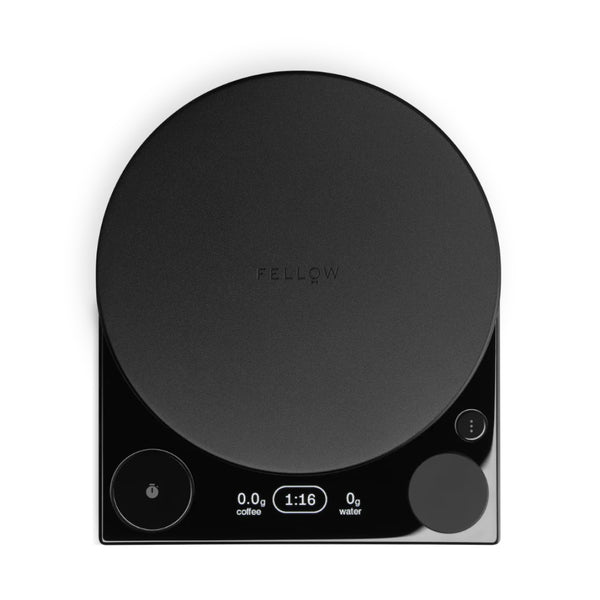
Take the guess-work out of your morning cup with the Fellow Tally Pro Coffee Scale. Built to take the concept of a 'coffee scale' to new heights, the Tally features a clever Brew Assist mode that automatically calculates how much water to pour based on the amount of coffee you use. This ensures your coffee is always on-spec (and that you don't need to use your phone calculator just to brew a cup). Designed in concert with the Fellow Stagg EKG, the Tally features a sleek glass-and-metal design compete with matching adjustment knob and under-glass display. Built for daily use, the Tally also features 0.1g accuracy, a water-resistant construction, and a USB-C rechargeable battery.

What's In The Box
Fellow Tally Pro coffee scale, USB-C to USB-A charging cable, Removable weigh pan, Travel shims (detachable feet for protection).

Setup & First Use

Before first use, remove any protective film from the display. Charge the Tally using the included USB-C to USB-A charging cable — connect to any standard USB-A charging block (not included). A full charge takes 1–2 hours and provides approximately 13 hours of continuous use. Most users charge once every 1–2 months under normal use.

Press the power button to turn on. The OLED display shows the current mode. The Tally has three modes: Brew Assist (coffee-to-water ratio calculator), Timer (simultaneous weight and timer display), and Weight (g, oz, lbs, ml). Cycle through modes by pressing the mode button.

Maximum capacity: 2,500g (5.5 lbs). Do not exceed this limit — overloading may damage the load cell. The Tally is water-resistant but NOT waterproof — do not submerge or pour water directly on it. Clean with a damp cloth only.

Remove the weigh pan by lifting it straight up — it sits magnetically on the scale platform. Clean the weigh pan separately with a damp cloth or mild soap and water. Hand wash only; do not put in dishwasher.

Tutorials & Training

Brew Assist Mode

Brew Assist guides you to the exact water volume for any coffee dose based on your chosen ratio. Place your empty brewer on the scale, tare to zero, add your ground coffee, and tare again. The scale reads your coffee dose and calculates how much water to pour at your set ratio. Follow the on-screen prompts to pour. The display shows your target weight and current poured weight simultaneously as you pour.

Set your preferred ratio in Brew Assist mode before brewing. Common ratios: V60 pour-over 1:15–1:17; Chemex 1:15–1:16; AeroPress 1:12–1:15; Kalita Wave 1:15–1:17; French press 1:14–1:16.

Timer Mode

Timer Mode displays both the elapsed time and cumulative weight simultaneously. Place your brewer on the scale, tare to zero, start the timer at the start of your bloom pour, and track weight and time together. This is the most useful mode for experienced manual brewers who want both metrics in view without switching screens.

Weight Mode

Weight Mode switches between grams, ounces, pounds, and milliliters — useful as a general kitchen scale beyond coffee. Press the unit button to cycle through units. Tare with the tare/zero button as needed.

Auto-Tare and Timer Start

The Tally can be configured to auto-start the timer when weight is detected. Check the Gear Guide at fellowproducts.com/pages/tally-gear-guide for current firmware features and mode configurations.

Cleaning & Maintenance

After Each Use

Remove the weigh pan and wipe the scale platform with a damp, non-abrasive cloth. Hand-wash the weigh pan with mild soap and warm water. Dry thoroughly before replacing. Do not put any part of the scale in the dishwasher.

Battery

The Tally's built-in lithium-ion battery charges via USB-C. When the battery is low, the scale flashes the remaining battery level when powering on or off. Charge using any standard USB-A charging block with the included USB-C to USB-A cable. Full charge in 1–2 hours.

Troubleshooting

Scale Not Turning On

Charge the battery using the included cable and a USB-A charging block. If the battery is fully depleted, allow 10–15 minutes of charging before attempting to power on.

Inconsistent Readings

Place the scale on a flat, level surface — uneven surfaces cause inaccurate readings. Remove the weigh pan and check that the platform is clean and free of debris. Tare before each measurement.

Brew Assist Not Calculating Correctly

Ensure you tare the scale after placing the empty brewer and again after adding coffee before Brew Assist calculates your water target. Both tare steps are required.

Warranty and Support

Fellow Products carry a 2-year limited warranty, for warranty support and product registration, please visit https://fellowproducts.com/

About Fellow

Fellow

About Fellow

From the design of the Stagg EKG through their line of mugs and steepers, form meets function with Fellow. Thankfully, Fellow offers exceptional build quality and performance to match their aesthetic design. These amazing coffee products are also easy to use, making them a compelling option for the coffee enthusiast. Seattle Coffee Gear is happy to offer a great variety of Fellow coffee equipment for you to explore!
Brand warranty information

What it Covers: Fellow Electric Kettles and Grinders

Length: 1 Year Electric: Stagg EKG, Stagg EKG+, Corvo EKG, Ode Brew Grinder

Length: 2 Year New Generation Electric: Stagg EKG Pro, Stagg EKG Pro Studio Edition, Ode Brew Grinder Gen 2, Fellow Opus

Who Supports the Warranty: Fellow Products

Warranty Contact Information: hello@fellowproducts.com

Back To Fellow Guides Shop Fellow