← Back to Brand Guides
Fellow Ode Coffee Grinder - Gen 2

Fellow Ode Coffee Grinder - Gen 2

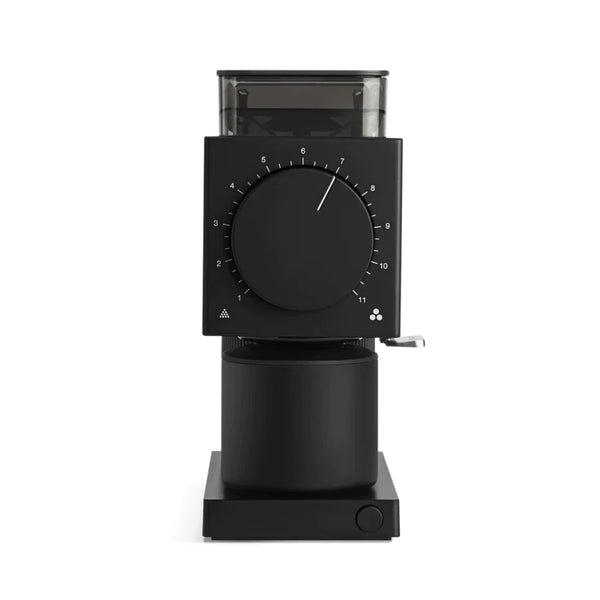
Fellow’s first foray into home grinding was a smashing success with room for a little improvement, and now Fellow’s long awaited Ode Gen 2 Coffee Grinder with new burrs twirling in its heart is here. Designed in house by the Fellow VP of R&D, a certified Q Grader, the Gen 2 burrs deliver a uniform and consistent grind size that maximizes flavor extraction. The evenness of the extraction means that you’re getting the best possible flavor out of the carefully sourced and processed coffee from your favorite roaster. With 31 grind settings there’s a step for every method except espresso, and whether you're brewing Aeropress, pourover, batch brew or French press you’ll be delighted with the depth and clarity of flavor. We love the single dose workflow of this grinder, and with its new anti-static technology there’s less mess than before. Available in Black or White, this minimalistic styled Fellow Ode Gen 2 Coffee Grinder creates maximum flavor for your home coffee bar.

Warranty
1 Year Manufacturer Warranty
What's In The Box
Fellow Ode Gen 2 brew grinder, Magnetic catch cup with lid, Cleaning brush, Power cord.

Setup & First Use

Before first use, remove all packaging. Season the burrs by running 30–50g of whole beans through the grinder at a medium setting and discarding the grounds — this removes any manufacturing residue and settles the burrs.

The Ode Gen 2 uses 64mm professional-grade flat stainless steel burrs optimized for filter brewing methods — pour-over, French press, cold brew, AeroPress, and drip. It is not designed for espresso grinding; the grind range starts above espresso-fine settings. For a grinder covering both espresso and filter, see the Fellow Opus.

The single-dose bean load bin holds up to 100g of whole beans. Pour your dose directly into the load bin before each grind. The single-dose design minimizes oxygen exposure and eliminates stale grounds retention between sessions — every grind is fresh.

The 31 grind settings span the full filter brewing range from fine (AeroPress) to coarse (cold brew/French press). Setting 1 is finest; setting 31 is coarsest. For V60 pour-over, start around setting 12–18 and adjust based on brew time and taste.

Tutorials & Training

31 Settings — Finding Your Grind

The Ode Gen 2's settings cover: AeroPress (fine end, settings 1–8), V60 and Chemex (settings 10–20), Kalita Wave (12–18), drip/batch brew (15–22), French press (22–28), cold brew (25–31). These are starting points — adjust based on your specific beans, roast level, and target brew time. Lighter roasts typically require finer settings than darker roasts for the same brew method.

Single-Dose Workflow

Weigh your coffee dose on a scale before loading. Pour beans directly into the load bin. Place the catch cup (magnetic, self-aligning) under the grind outlet. Press the start button. The Ode grinds until the bin is empty and stops automatically (auto-stop). Gently press the grinds knocker on top to clear any remaining grounds from the chute.

Anti-Static Technology

The Ode Gen 2 includes anti-static technology (RDT-equivalent ionization) that reduces static buildup during grinding. This minimizes grounds clinging to the catch cup walls and distributes the ground coffee more evenly — particularly important for pour-over brewing where even coffee bed distribution affects extraction.

Burr Upgrade Path

The Ode Gen 2 uses standard 64mm flat burr geometry. Third-party burr sets (SSP, etc.) are available for users who want to extend the grind range into espresso territory or optimize for specific brew methods. This is an advanced modification — see the Fellow help center or community forums for guidance.

Cleaning & Maintenance

Weekly

Use the included cleaning brush to sweep the grinding chamber, burr ring, and grind outlet after every few sessions or whenever you switch beans. Brush downward through the chute and wipe the catch cup. The catch cup is hand-wash only.

Monthly — Burr Cleaning

Remove the top burr by rotating counterclockwise until it unlocks — no tools required. Brush the upper and lower burrs with the cleaning brush to remove coffee oil buildup. Wipe the grinding chamber with a dry cloth. Do not use water on the burrs or grinding chamber. Reinstall the upper burr and run a small amount of beans before brewing to clear any residue.

Grinder Cleaning Tablets

Use grinder cleaning tablets (Grindz or equivalent) every 1–2 months to dissolve coffee oils from the burrs. Run at a medium grind setting (approximately 15), then follow with 30g of beans to purge residue before brewing.

Troubleshooting

Grinder Won't Start

Check that the grind setting dial is properly seated and the load bin is in place. Confirm the power cord is connected.

Uneven Extraction / Channeling

Anti-static technology helps but distribution matters too. Use the grinds knocker and consider a WDT tool to distribute grounds in your dripper before brewing. Ensure the catch cup is seated correctly on the magnetic base.

Grind Too Coarse Even at Setting 1

The burrs may need re-seating. Remove and reinstall the upper burr, ensuring it is fully locked. Alternatively, the burrs may need replacement after high-volume use.

Warranty and Support

Fellow Products carry a 2-year limited warranty, for warranty support and product registration, please visit https://fellowproducts.com/

About Fellow

Fellow

About Fellow

From the design of the Stagg EKG through their line of mugs and steepers, form meets function with Fellow. Thankfully, Fellow offers exceptional build quality and performance to match their aesthetic design. These amazing coffee products are also easy to use, making them a compelling option for the coffee enthusiast. Seattle Coffee Gear is happy to offer a great variety of Fellow coffee equipment for you to explore!
Brand warranty information

What it Covers: Fellow Electric Kettles and Grinders

Length: 1 Year Electric: Stagg EKG, Stagg EKG+, Corvo EKG, Ode Brew Grinder

Length: 2 Year New Generation Electric: Stagg EKG Pro, Stagg EKG Pro Studio Edition, Ode Brew Grinder Gen 2, Fellow Opus

Who Supports the Warranty: Fellow Products

Warranty Contact Information: hello@fellowproducts.com

Back To Fellow Guides Shop Fellow